
Introduction
Agenda:
| 7:00 | Intro |
| 7:02 | Standard Operating Procedure (SOP) |
| 7:12 | Website structure |
| 7:27 | Dashboard |
| 7:42 | Creating a Post |
| 8:00 | Exercises |
| 8:30 | Wrap up |
Intro
NSC.ca has existed since 1995 and has undergone several iterations. It was upgraded in 2023 to include accessibility features, search ranking boosters, and a more modern look to attract new members.
SOP
The Website Standard Operating Procedure serves as the framework for the website’s functionality.
Make sure you’ve read it and consult it when needed. Please report changes you feel are needed using the “Web Help/Feedback” button at the top of the website.
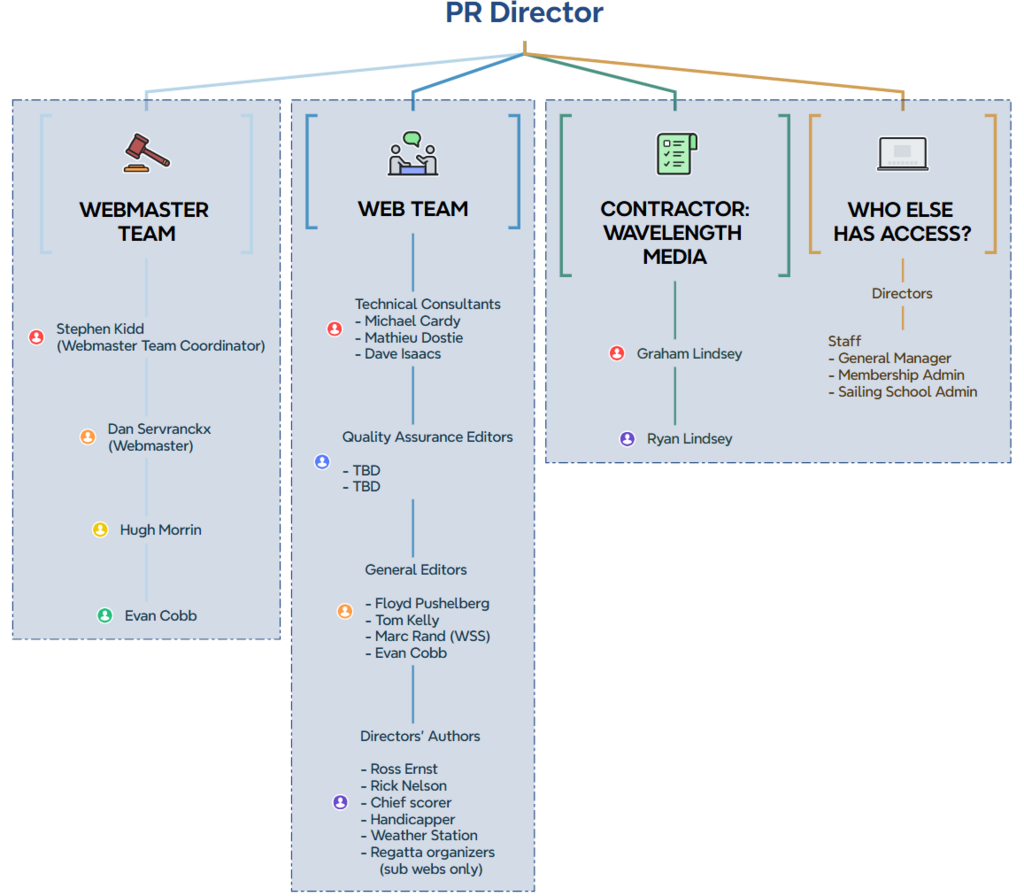
Here is the structure of key players involved in nsc.ca (all committees also have volunteers who contribute):
Website Structure
7 Siloed Sub Websites
Complex as a multisite of 8 sites:
1 main site with 6 siloed sub-websites
- BYC/NSC Interclub Racing
- Club Championship
- FANFARE
- NOD
- Ottawa Cat and Skiff GP (Grand Prix)
- Sail Training
- nsc.ca/an/byc-nsc
- nsc.ca/an/clubchampionship
- nsc.ca/an/fanfare
- nsc.ca/an/nod
- nsc.ca/an/oscgp
- nsc.ca/an/sailtraining
For example, see several of these linked on the regattas page.
Pages
The website has pages and posts. Pages endure and are updated only infrequently, often only annually. Posts, by contrast, are transitory and only displayed on the site for a limited period of time. This is because they are announcements, notices, or event reports.
There are about 450 pages, plus many PHP pages. You can see the complete list of website-internal pages (i.e. non-PHP) in the Site Map.
Site Map
There is a link to the SiteMap at the very bottom of the footer on (almost) every website page. There are some areas needing better organization (= moving some of the pages – anyone game?)
The Site Map does not include PHP pages.
PHP pages
These are pages created over the years by the Webmaster, Dan Servranckx, to accommodate NSC’s special requirements. An example of a PHP page is https://nsc.ca/classifieds/ – notice that /an/ is missing in the URL, and there is no sidebar menu. Several pages of the Members Only area are also PHP pages.
Menus
The website has main menus at the top of every page, and, in this new website, a sidebar menu for each of those main sections that indicates with a ” > ” the page being viewed in that section of the website.
If you discover a commonly used page that you think should be displayed in the sidebar menu, let me know.
Dashboard
Pages structure
Note the structure of the page hierarchy, with dashes in front depending on the level a page is at in the hierarchy, i.e., which pages are children of parent pages. The pages are not organized with parents and their children immediately following; instead, they are arranged alphabetically under a single top page, and all of the top pages are alphabetical.
To find a page in that list, you can use the search box at the top right, or it may be easier sometimes to find a page you want to edit in “View Site,” where you can either find it in the main and sidebar menus, or just do a search. From there, click ‘Edit’.
Other features
- Posts
- These are not in any structure, just lined up one after the other in the “Blog”, which is the “Newsfeed“. The most recent eight posts are displayed on the website’s splash page (landing page). Any posts with the “Expired” category selected are not visible there and can be found on the News page or searched for. However, we have mostly stopped using the “Expire” category since posts age off quickly enough. Unlike pages, the best place to find all posts in chronological order is in the dashboard, under “Posts” in the sidebar.
- Events (See https://nsc.ca/an/events/)
- This is a WordPress-internal events calendar (separate from the Integrated Google Calendar). This calendar mainly includes live entertainment events and Winter Speaker Series talks. It is not yet included in any menu. The coming four events listed are visible on the Integrated Google Calendar page.
- Pages
- See above
- Media
- This will get you to the Media Library or to the “Upload new” page of the Media Library. The Media Library must be handled with great care. See the Images section below.
- Users
- A list of all user accounts on nsc.ca
Creating a post
To create a post, include the following elements. For a step-by-step guide, see the Writing WordPress Posts page.
- Post Title H1 (Heading 1 format)
- Date and Time format
- Subtitles
- H2, H3 etc – use whenever possible to break up the “wall of text”
- Content
- can be hand-typed or pasted in from MS Word, Google Docs etc.
- Images
- Use when possible to make visually attractive and break up “wall of text”, set them to the centre; the “Gallery” block is also a possibility
- Credit
- Include at the bottom who submitted the content
- URL
- Featured image
- Categories
- SEO
- Preview before hitting “Publish”
Kadence blocks
Kadence is a “theme” of WordPress consisting of easy-to-use “blocks”. Rather than using HTML code, as in the past, it’s pretty WYSIWYG (what you see is what you get), and much more nimble.
Images and the Media Library
Images need to be copyright-ok. Use free sites or ask me. The Media Library needs to be handled very carefully. It already requires remedial work because of guidelines not being adhered to. See Writing WordPress Posts section on images.
Editing Pages
- You will be editing existing pages rather than creating them. But, as per the SOP, if you need one created or moved, make a request to the webmaster team. This is to ensure the integrity of the organizational structure of the website.
- Regarding content, most everything that applies to posts also does to pages.
- Be careful not to change the URL, or all the links in the website will break
- Do not “Save draft” unless it has not yet been published, since it unpublishes the page, and the links to it will break.
- Do not press the “Publish” button to save your changes, or you will create too many versions, wasting storage space. If it has not yet been published, you can use the “Save Draft” button. Otherwise, there is an automatic backup that regularly saves your work.
Exercises
Content
How can we improve this post?
Structure
Resources
Communications Hub
NSC Communications Hub: How to Share Your News, Events & Stories
How to WordPress
Jira
Service management software